![100066_PathWave_Logo_Update_NoTag_REVERSE-1.png]](https://support.pathwave.com/hs-fs/hubfs/100066_PathWave_Logo_Update_NoTag_REVERSE-1.png?height=40&name=100066_PathWave_Logo_Update_NoTag_REVERSE-1.png)
Overview
This article outlines the process for submitting bulk AT&T job upload requests to Pathwave. The goal of this process is to ensure AT&T jobs are imported accurately while allowing partners flexibility to align Pathwave job data with their internal operational systems.
AT&T job data is typically sourced from IWM and must be supplemented with partner-level fields required within Pathwave prior to submission.
AT&T Job Data Source
For AT&T projects, job data is generally exported from IWM in the format outlined in the Pathwave AT&T Bulk Job Upload Template.
Note: The IWM export does not include all partner-level fields required in Pathwave. These additional fields must be completed before submitting a bulk upload request.
Partner-Level Fields in Pathwave
Pathwave includes partner-level job fields that support operational workflows, reporting, and alignment with internal systems. These fields may be used in whatever way best supports each partner’s business processes, including tracking projects outside of AT&T.
Partners have full flexibility to:
-
Align Pathwave fields with internal operations or third-party systems
-
Maintain consistent naming and tracking across multiple customers or carriers
-
Support internal reporting and workflow requirements
Required Partner-Level Fields
The following partner-level fields must be populated for each AT&T job uploaded into Pathwave:
-
Job Name
-
End User Site Name
-
End User Site Number
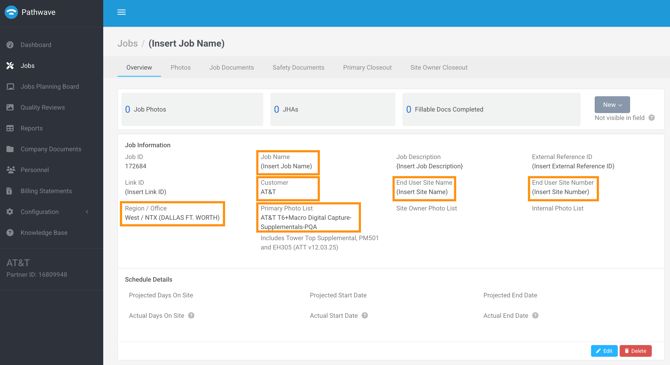
Important: The values provided for Region, Office, Customer, and Primary Photo List must already exist as selectable options within your Pathwave portal. New values cannot be created as part of the bulk upload process.
If updates to these options are needed, they should be requested prior to submitting a bulk upload.
Optional Partner-Level Fields
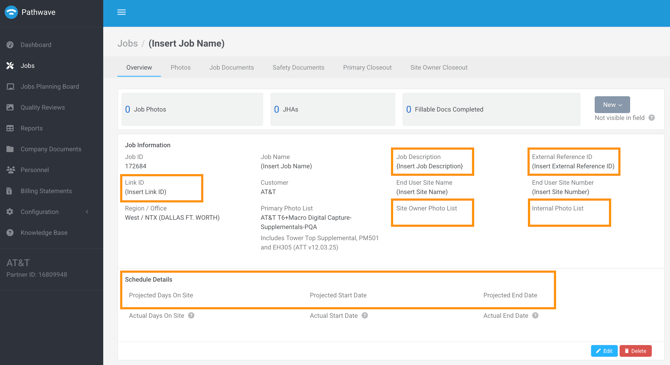
The following fields are optional but strongly recommended. Including them during the bulk upload process can reduce future manual updates and improve reporting and workflow visibility:
-
Job Description
-
External Reference ID
-
Link ID
-
Site Owner Photo List
-
Internal Photo List
-
Projected Days on Site
-
Projected Start Date
-
Projected End Date
-
Labels
Recommended Alignment with AT&T Job Fields
Partners may choose to populate Pathwave partner-level fields using values from AT&T job data if doing so supports internal consistency or operational reporting. This is optional and entirely at the partner’s discretion.
As a reference, Pathwave commonly sees the following mappings used, though partners may use different mappings based on their internal needs:
| Pathwave Partner-Level Field | Recommended AT&T Field |
|---|---|
| Job Name | IWM_JOB_NAME |
| Job Description | JOB_SCOPE |
| End User Site Name | IWM_JOB_NUMBER |
| End User Site Number | FA_LOCATION_CODE |
| External Reference ID | ORACLE_PTN |
This mapping is optional and intended as guidance only. Partners remain responsible for ensuring all required Pathwave fields are populated correctly.
These mappings are provided as guidance only and are not required.
Requesting Custom Job Fields
Partners may request custom job fields to further align Pathwave with their internal systems and reporting requirements. Custom fields can be used to track additional metadata that is not covered by standard Pathwave job fields.
If you would like custom job fields added to your Pathwave portal, please submit a request to:
When submitting a request, include:
-
The name of the field
-
A brief description of how the field will be used
Custom field requests are reviewed by the Pathwave team prior to configuration.
Bulk Upload Template
Partners are required to use the Pathwave AT&T Bulk Job Upload Template when submitting bulk job requests.
-
The template is pre-formatted to align with Pathwave import requirements.
-
Column headers, formatting, and structure must not be modified.
-
Partners are responsible for populating all required partner-level fields prior to submission.
-
Prepare AT&T job data (typically exported from IWM).
-
Populate the Pathwave AT&T Bulk Job Upload Template.
-
Verify all required partner-level fields are completed and reference valid portal options.
-
Submit the completed template to support@pathwave.com
Validation and Processing
Once a bulk upload request is received, the Pathwave team will:
-
Review the file for completeness and formatting
-
Validate required partner-level fields
-
Import the jobs into the partner’s Pathwave portal
Note: If required information is missing or incorrectly formatted, the file may be returned for correction prior to processing.
Direct Integration Opportunities
While bulk uploads are a reliable way to add jobs to Pathwave, the most efficient and scalable approach is through a direct integration with your internal systems.
Direct integrations allow partners to:
-
Automatically create and update jobs in Pathwave
-
Reduce manual file preparation and uploads
-
Maintain real-time alignment between internal systems and Pathwave
-
Improve data accuracy at scale
Partners interested in exploring direct integration options can schedule time with the Pathwave team:
Schedule an Integration Discussion: Discovery Meeting Link
For technical teams, Pathwave’s API documentation is available for review:
View Swagger API Documentation
Best Practices
-
Confirm Region, Office, Customer, and Photo List options are configured in your portal before submitting.
-
Use partner-level fields consistently to support internal workflows.
-
Include optional fields whenever possible to minimize follow-up requests.
-
Avoid modifying the bulk upload template structure.
Need Assistance? Contact Pathwave support team at support@pathwave.com.