
The Crew Lead Time Card is a fillable job document completed by Amentum Crew Leads directly within the Pathwave mobile app on an iPad or phone.
Crew Lead Time Cards appear under Fillable Job Documents for a job. If the Crew Lead Time Card is not already applied, it can be added directly from the field.
Important Notes
-
Fillable Job Documents are not available in offline mode.
An active internet connection is required to open, save, or complete the Crew Lead Time Card.
-
The Crew Lead Time Card can also be completed in the Pathwave portal.
For portal-based instructions, see: Completing Fillable Job Documents in the Pathwave Portal
Access a Job and Navigate to the Crew Lead Time Card
-
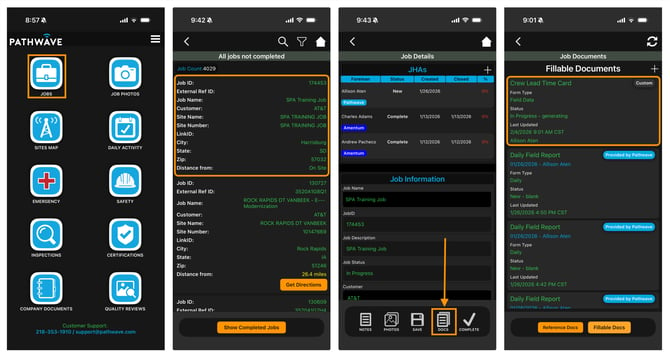
Sign in to the Pathwave app on your iPad or phone
-
Select Jobs
-
Select the appropriate job
-
Select Docs at the bottom of the Job Details screen
-
Select Fillable Documents
This section displays all fillable forms currently associated with the job, including the Crew Lead Time Card if it has already been added.
Complete the Crew Lead Time Card
-
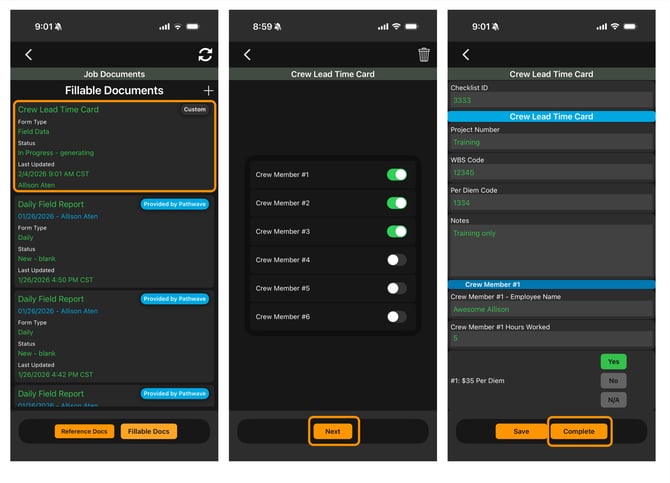
From the Fillable Documents list, select Crew Lead Time Card
-
Enter the required information
-
To save progress, select Save
-
Saved Time Cards remain in progress and can be reopened and edited from the field
-
-
To submit the Time Card, select Complete
Add a Crew Lead Time Card to a Job (If Not Already Applied)
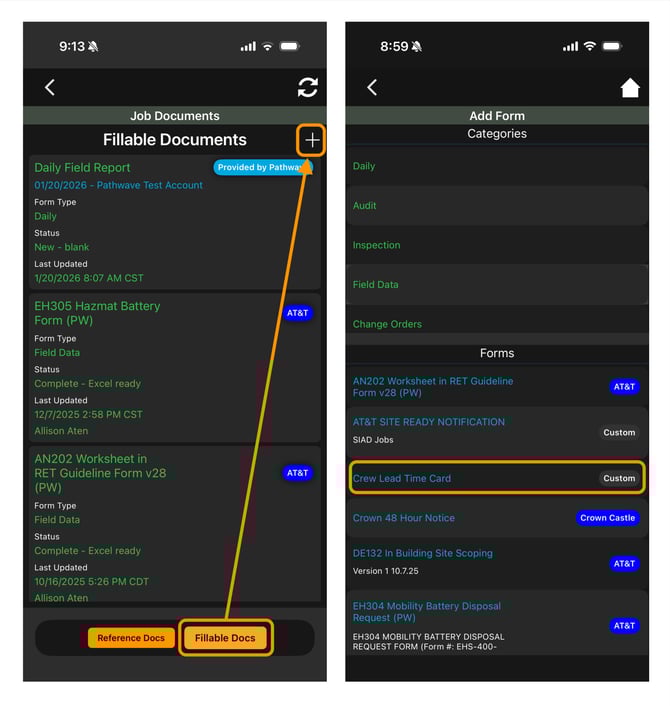
If the Crew Lead Time Card is not listed under Fillable Documents:
-
Select the “+” (white plus) button in the top-right corner of the Fillable Documents section
-
Locate and select Crew Lead Time Card from the list
-
The form is added to the job
-
Open the Crew Lead Time Card and complete it following the steps above
Once added, the Crew Lead Time Card remains available under Fillable Documents for that job.
Need Help?
If you have questions or need assistance with Fillable Job Documents, contact the Pathwave Support team.
-
Email: support@pathwave.com