
Published 10/5/26
🎥 Training Video 🎥
Overview
Pathwave now lets crews record their daily tailgate meeting directly from the JHA. The recording is attached to the JHA when it's signed and turned into a transcript. Partner admins can use these transcripts to review the quality of safety discussions, share what good meetings look like, and coach crews. Recordings are not used for discipline, and nobody is scored on their public speaking.
Before You Begin
- JHA Transcription must be turned on for each partner. It isn’t on by default, and only a Partner Admin can request it. Once Pathwave turns it on, the recording box appears on the user’s JHA. JHA Transcription Access Request form
- Partner Admins: submit the request with the template. Download the JHA Transcription Request and add each user who needs transcription turned on. Then email the completed template to support@pathwave.com.
- Field techs: if you need transcription, ask your Partner Admin to add you to the template.
- The user’s system role must be Foreman or higher. Update any Field Crew users before submitting the template.
- You need an active job with a JHA in progress.
- Your device must allow Pathwave to use the microphone.
Steps
- Open your JHA and go to the Signatures page. Fill out the JHA as usual. When you reach the Signatures page, you'll see a new recording box. It reads No recording yet until you start.
- Start recording. Tap [Record] to begin. A timer shows how long you've been recording. You can sign before or after recording, because starting a recording doesn't lock you out of anything.
- Hold the tailgate discussion. Talk through the day's work in whatever language your crew is most comfortable with. Cover these four things:
- Scope of work: what's being done today, the goals, and confirmation that everyone understands.
- Hazards: use the energy wheel, and get input from the whole crew.
- Controls and PPE: call out any special PPE, such as a face shield or welding hood.
- Safety topic: a brief topic that fits the day's work. You can use a canned topic from Pathwave or bring your own.
- Move around the app as needed. The recording keeps running while you navigate anywhere in Pathwave, and a recording indicator stays at the top of your screen. Use this to pull up what you need during the meeting:
- The JHA form itself
- Job Details > Documents, for fillable and reference documents
- Safety topics, from the home screen
- Emergency location information
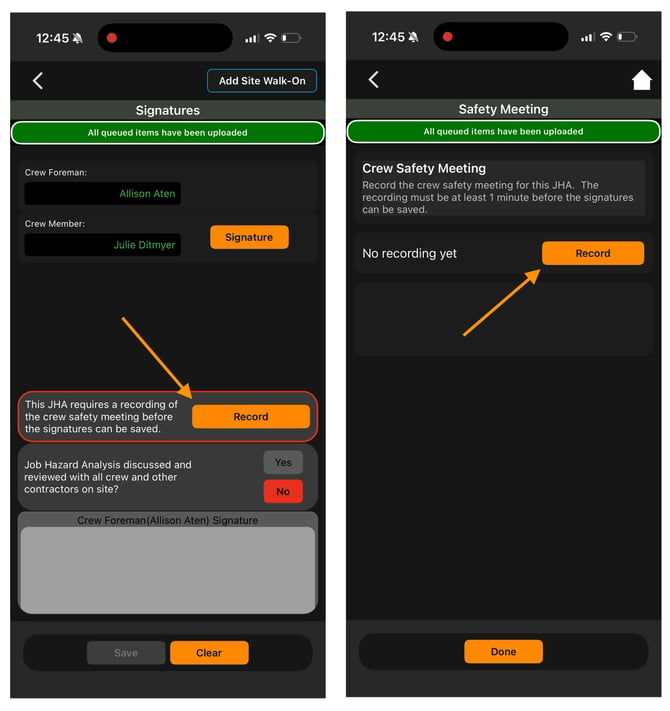
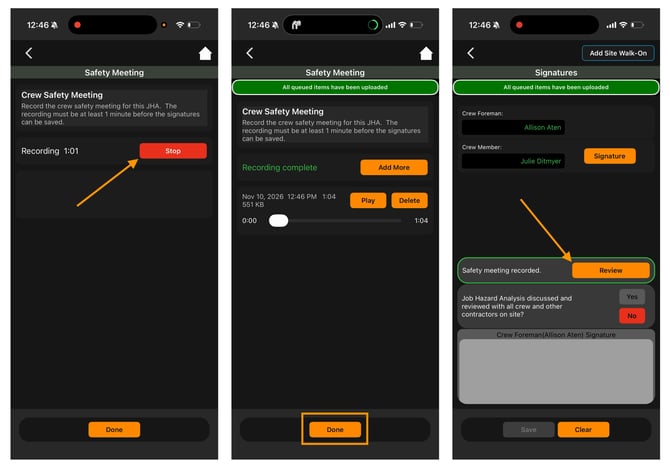
- Stop or add more. Tap Stop when you're finished. If you get interrupted, come back to the Signatures page and add to the recording. You can keep adding until the JHA is fully signed.
- Collect all signatures to finalize. Have every crew member sign as normal. The final signature locks the recording and sends it for processing. After that, you can't add more.
- Review the recording (optional). On the Signatures page, tap [Review] to play back the audio.
Tips & Notes
- Recording locks at the final signature.
- Use any language. Pathwave handles transcription and translation, so crews are encouraged to speak in their preferred language.
- Content matters more than polish. Reviewers look at how detailed the discussion is, how well hazards and controls are identified, and how engaged the crew is.
Troubleshooting
Q: I don't see the recording box on the Signatures page.
A: Recording is only on for team members whose names have been added. Check with your Partner Admin.
Q: I got interrupted mid-meeting. Do I have to start over?
A: No. As long as the JHA hasn't received its final signature, go back to the Signatures page and add more to the recording.
Q: Will the recording stop if I leave the JHA?
A: Not if you stay inside Pathwave. It keeps recording while you move between screens.