
Understanding How Closeout Packages (COPs) Are Generated in Pathwave
Pathwave’s Closeout Package (COP) workflow brings together all job-level deliverables—photos, documents, job details, and safety outputs—into a consistent, structured package ready for partner and customer submission. The system automatically assembles content from multiple areas of the job, applying standardized labels, organizing folder structures, and streamlining the preparation process for COP and QA teams.
This article explains how each component of a COP is sourced, how Pathwave organizes the content, and the customization options available to partners.
- How Pathwave Pulls COP Content
- How Pathwave Structures COP Photos
- Job Documents in the COP
- Building and Customizing COP Templates
- Export Customization Options
- Generating Multiple COP Packages at Once
How Pathwave Pulls COP Content
Pathwave assembles the Closeout Package by pulling deliverables from multiple sections of the job, as well as files uploaded directly into COP folders. Content may originate from:
- Photos captured or uploaded to fulfill the Primary or Site Owner Photo List
- Job Documents, including both reference documents and fillable documents
- Safety outputs such as JHAs and the RG123
- Files manually uploaded into COP folders, including customer-specific documents, test results, approvals, or any other required deliverables
Because COP folders can accept direct uploads, partners have flexibility to include additional items that are not sourced from other areas of the job. Anything placed in a COP folder—such as sweep test results, fiber test reports, or customer-specific documents—will be included as part of the generated COP.
This layered sourcing approach ensures that the final package is complete, customizable, and aligned with program requirements.
Photos Included in the COP
The Photos tab includes all photos required for the Primary or Site Owner COP.
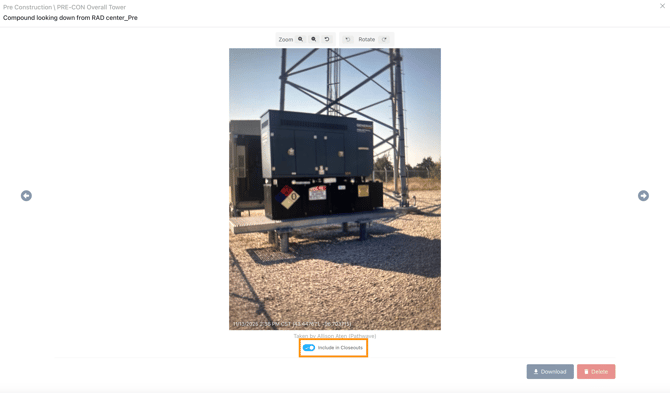
Photo Exclusion Option
Some partners capture more photos than required for COP submission. Pathwave allows users to toggle a label at the photo level to exclude selected photos from the COP—without removing them from the job record.
This allows teams to retain context photos while ensuring only approved deliverable photos appear in the final package.
How Pathwave Structures COP Photos
When a COP is generated:
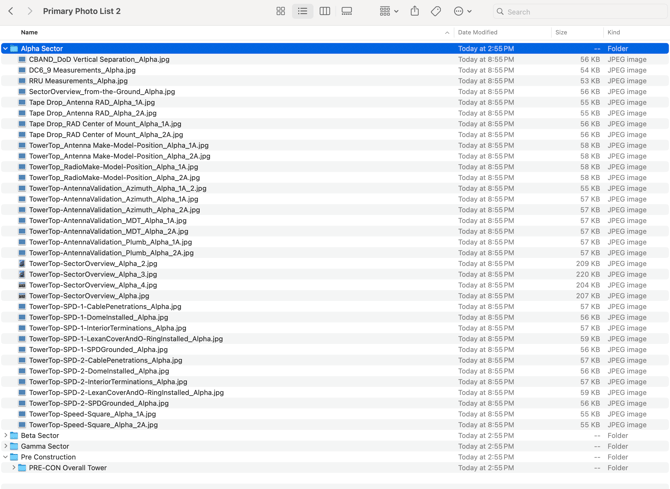
- All photos required by the checklist are exported in a consistent format across all jobs
- Each photo is uniformly labeled to match the corresponding item on the Photo List
- Folder structures reflect the COP template selected by the partner
This standardization equips COP and Quality teams with a reliable, organized deliverable set, streamlining the review process.
Job Documents in the COP
The Job Documents tab contains both Reference Documents and Fillable Documents, each serving a different purpose in the COP workflow.
Reference Documents
Reference documents are site-specific files that the field or back office may need to reference or redline, such as:
- Site CDs
- RFDS sheets
- Structural reports
- Carrier-provided project documentation
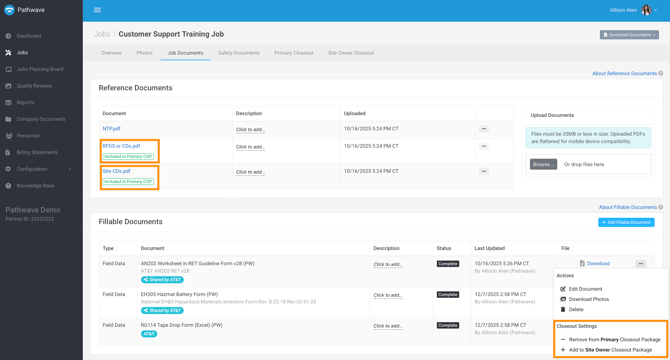
These documents can be included in the COP by applying a COP Include label.
Fillable Documents
Fillable documents are intended to be completed by field teams or back office staff and typically form part of the COP or safety program. Pathwave automatically:
- Prepopulates fields using data from the Job Details tab
- Pulls photos linked to the relevant checklist
- Places those photos into the correct section of the customer template
Examples: Verizon Greenbook forms, AT&T EH305 forms.
This automation greatly reduces preparation time and improves submission accuracy.
Partners can label any document to include it in the Primary COP and/or Site Owner COP.
Building and Customizing COP Templates
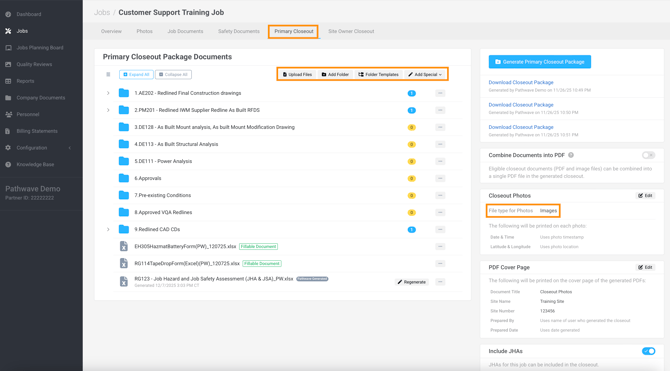
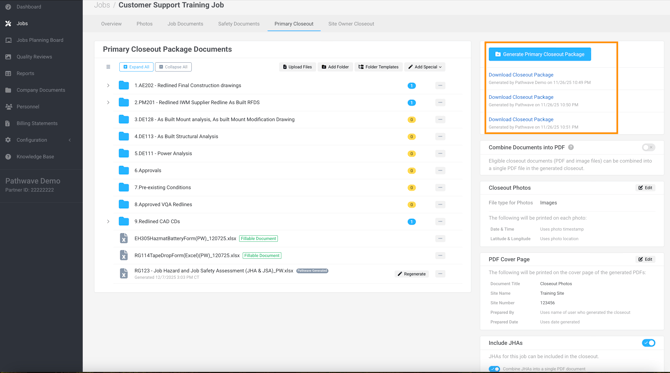
The Primary COP tab allows partners to build a customized COP template by defining a folder structure that aligns with customer expectations.
COP Template Structure
Partners can create a dedicated folder for every required deliverable. Each folder displays:
- A yellow bubble showing the “0” indicator when content is still missing
- A yellow bubble showing number of files uploaded
This gives COP and QA teams real-time visibility into progress and outstanding requirements.
Export Customization Options
Partners can customize how COP outputs are generated:
- Export photos as a ZIP file containing .jpg images
- Export all COP photos as a combined PDF with a customized table of contents
- Apply a custom COP cover sheet
- Combine all PDF documents into one complete COP file
These options allow partners to tailor the output for different customers, internal reviewers, or program expectations.
Safety Deliverables Included in the COP
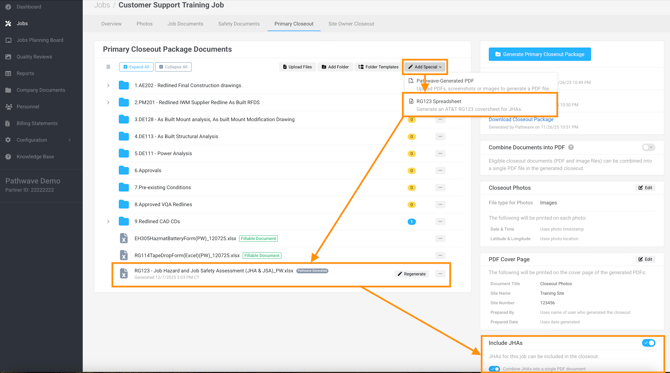
Pathwave supports the automated generation of AT&T safety requirements, including:
RG123 Production
Pathwave can generate the full RG123 safety package, which includes:
- A JHA cover sheet
- A tab for each day onsite
- Elevated vs. non-elevated work indicators
- Auto-pulled NWSA certification data for all personnel who participated in the JHA
Partners can also choose to combine all JHAs into one file.
This ensures consistent compliance across AT&T projects and removes manual consolidation work.
Generating Multiple COP Packages at Once
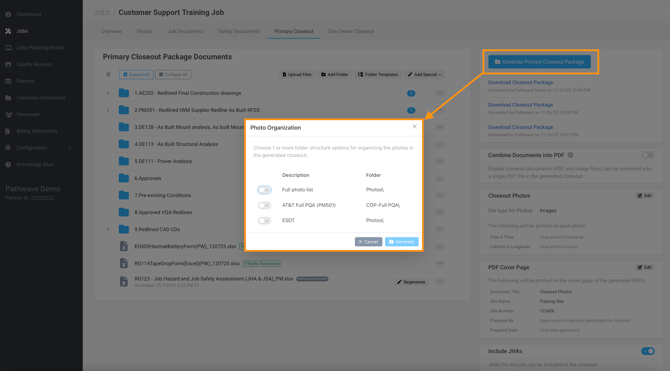
Some photo lists allow users to generate multiple COPs in a single action.
For example, an AT&T job may offer COP outputs such as:
- ESDT COP
- Full PQA Package
- Regulatory Package
Users can select any combination of available packages before clicking Generate COP.
Pathwave then produces each package according to its own folder structure and deliverable rules.
Summary of Key Benefits
Pathwave’s COP workflow provides:
- Automated data population from job details
- Consistent photo labeling and structure
- Integrated form and photo pairing
- Customizable COP templates and export formats
- Automated safety package generation
- Ability to produce multiple COPs in one step
- Reduced administrative burden and faster submission timelines