
Job fields are the foundation of how projects are organized, located, filtered, and managed across Pathwave. Whether jobs are created manually, through bulk uploads, or via API integrations, consistent job setup ensures every team—project management, construction management, quality teams, field personnel, and back-office teams—can manage work uniformly.
This article provides a concise reference for required job fields, optional properties, and partner-specific Additional Fields.
1. Purpose of Job Fields
Job fields define:
- How jobs appear in search results (portal and mobile)
- How teams filter, organize, and track work at scale
- What photo list and scope of work (SOW) applies to the job
- Which region/office is responsible
- Which subcontractor or crew is assigned
- How internal project identifiers flow across systems
- What metadata is available to field teams when choosing jobs on the mobile app
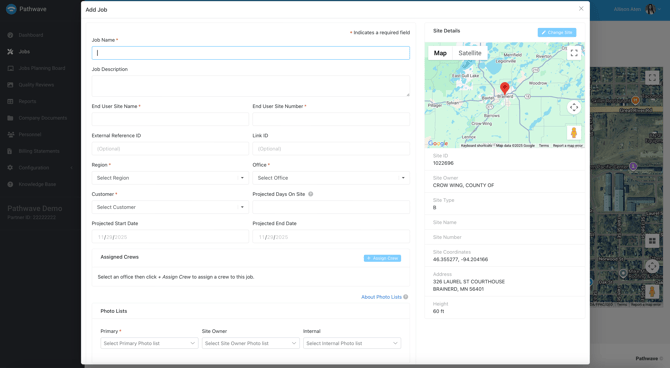
| Required Fields | |
| Job Name | The internal name your teams use to locate and track the project |
| End User Site Name | The site name exactly as shown on construction drawings. |
| End User Site Number | The site number from construction drawings. |
| Customer | The customer or program the work is being completed for. |
| Primary Photo List | The required photo list applied to the job for field documentation and quality review. |
| Region | Region the job belongs to. Managed under Configuration → Regions/Offices. |
| Office | Office or sub-region assigned to the job. Managed within Region settings. |
| Optional Fields | |
| Description | A short summary of the job’s scope of work (SOW). |
| Status | Pathwave job status (New, Planning, Ready, In Progress, Complete). New & Planning do not display in the app. |
| External Ref ID | The job identifier from your external system (e.g., Ops Center, work order number). |
| Link ID | Used for microwave site relationships or link-based tracking. |
| Job Assignments | Oversight personnel who receive automated notifications (e.g., when a JSA is completed). |
| Subcontractors | Subcontractor assigned to work the job. |
| Site Owner Photo List | Additional required photo list for site owner compliance (e.g., AT&T, TowerCo). |
| Internal Photo List | Internal Pathwave photo list for QA or proprietary processes. |
| Proj. Days On Site | Estimated number of days field teams will be onsite. |
| Proj. Start | Estimated project start date. |
| Proj. End Date | Estimated project completion date. |
| Labels | Custom labels created under Configuration → Labels for enhanced filtering and reporting. |
| Crews | Crews assigned to the job. Created under Personnel → Manage Crews. |
| Site Selection (Yes/No) | Indicates whether a manual site selection is required. Yes: user must confirm the location. No: location is auto-created using provided details. |
Additional Fields (Partner-Specific Identifiers)
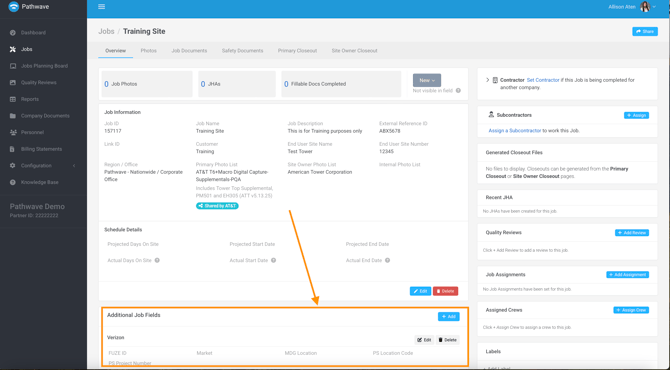
Many enterprise partners rely on project identifiers that fall outside Pathwave’s default job fields. Pathwave supports adding Additional Fields to capture these customer-specific or internal identifiers so that jobs remain recognizable across all systems and departments.
These fields can be:
- Applied during manual job creation
- Included in bulk upload templates
- Passed automatically through API integrations
- Searched and filtered by field teams in the mobile app
- Exported through reporting
- Mapped directly into end-user deliverables (forms, RG-123, COPs, summary sheets, PDFs, etc.)
Why This Matters
Mapping job fields—including Additional Fields—into deliverables ensures that:
- Field teams do not manually type project identifiers on forms
- Back-office teams do not re-enter data when preparing documentation
- Customer-required identifiers (IWM, FA Location Code, PTN, Fuze ID, etc.) always appear correctly
- Job details remain consistent across your internal systems, Pathwave, and deliverables
- Data quality is maintained at scale
This ability allows Pathwave to fully mirror your internal naming conventions and customer programs, creating a single, unified structure across departments and integrated systems.
Common Examples
AT&T Programs
- IWM
- FA Location Code
- PTN
- National Program
Verizon Programs
- Fuze ID
- Market
- Technology Type
Other Partner Examples
- PO Numbers
- Internal Project Codes
- Regional Codes
These fields allow Pathwave to mirror your internal naming conventions, ensuring jobs remain recognizable across departments and integrated systems.
Why Consistent Job Setup Matters
Consistent use of job fields supports:
- Uniform project organization across all departments
- Accurate filtering and searchability for field personnel
- Clean reporting for leadership and PM teams
- Proper SOW alignment through the correct Primary Photo List
- Reliable data exchange for integrations and bulk operations
- Clear visibility into subcontractor and crew assignments
Well-structured jobs reduce confusion, eliminate duplicate data, and ensure every team works from the same source of truth.
Summary
Job fields in Pathwave provide a unified, structured way to manage projects across all departments. Using default job fields—along with partner-specific Additional Fields—ensures your organization can scale consistently, deliver accurate documentation, and maintain clear visibility across programs.
For assistance configuring job fields or creating Additional Fields, contact support@pathwave.com.