
Overview
Quality Review in Pathwave uses a set of clear, structured status categories to communicate the current state of each photo captured on a job. These categories provide real-time visibility into what actions are required, who needs to take those actions—the reviewer or the field team—and how close the review is to completion.
These indicators create predictable workflows, reduce rework, and ensure that all teams remain aligned throughout the review process.
Quality Review Status (Review-Level)
Each review displays a high-level status that reflects where it sits in the review lifecycle:
New |
|
In Progress |
|
Completed |
|
Canceled |
|
Review-level statuses give project managers and suppliers a quick understanding of overall progress.
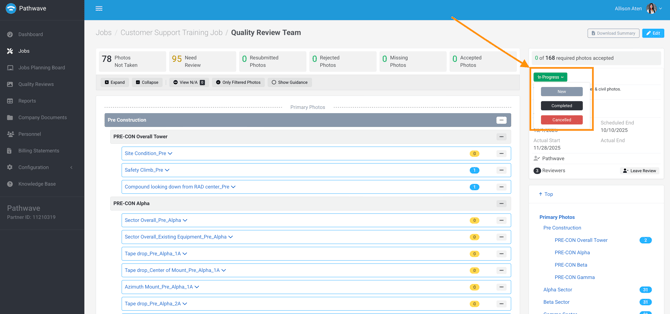
Understanding Review Statuses in Pathwave
Photo Status Categories (Photo-Level)
Every photo in a Quality Review is organized into one of six action-driven categories. These categories define who needs to take the next action and what work is still outstanding.
Categories That Require Field Action
Description |
Action Required |
|
Photos Not Taken |
Required items on the Primary or Site Owner photo list that do not have the minimum required number of photos. | Field teams must capture and upload the missing photos. |
Rejected Photos |
Photos that have been reviewed and rejected due to quality issues, incorrect angle, missing required elements, or non-compliance with project standards. | Field teams must retake the photo, review the markup or comments, and submit a corrected version. |
Missing Photos |
Additional placeholders created by the reviewer for new documentation needs identified during the review (items not originally on the photo list). | Field teams must capture and submit photos for these newly created placeholders. |
Categories That Require Reviewer Action
Description |
Action Required |
|
Need Review |
Photos that have been uploaded by the field team and are waiting for initial evaluation. |
Reviewers must accept or reject these photos. Comments and markup can be added for clarity. |
Resubmitted Photos |
Photos that were previously rejected and have been replaced by the field team. |
Reviewers must reevaluate the new photos and accept or reject them. |
Categories That Require No Action
Description |
Action Required |
|
Accepted Photos |
Photos that have been reviewed and approved. |
None. These items are complete. |
Why These Categories Matter
These categories ensure that all teams understand:
- What is preventing the review from being completed
- Which items are awaiting field corrections
- Which items are awaiting reviewer evaluation
- How closely the review is tracking with field activity
- Whether additional resources or follow-up are required
- This level of clarity is especially valuable for multi-team programs, PQAs, and carrier-led requirements where timeliness and accuracy are critical.
Note: Photo status categories apply only to photos captured on Primary and Site Owner photo lists. Photos captured on Internal photo lists do not participate in Quality Review.