
Overview
Rejection reasons are an essential part of the Quality Review workflow in Pathwave. They explain why a photo does not meet requirements and guide field teams on what must be corrected. Standardized rejection categories improve reviewer consistency, reduce back-and-forth communication, and speed up corrective cycles—especially during time-sensitive review programs or PQAs.
Partner-defined custom rejection reasons allow organizations to align the review process with internal standards, customer deliverables, or specialized scopes of work.
Why Rejection Reasons Matter
Rejection reasons provide:
- Clear, consistent explanations for corrective actions
- Less ambiguity for field crews
- Faster remediation and fewer repeated rejections
- Better alignment across subcontractors and regions
- Stronger compliance with customer or site-owner requirements
- Reinforcement of internal quality expectations
They ensure that all teams follow the same quality standards.
Types of Rejection Reasons in Pathwave
1. Standard Rejection Reasons
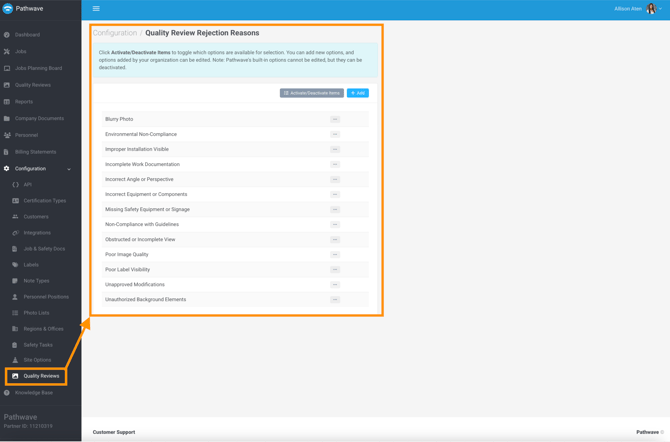
Pathwave provides a default set of standard rejection categories that cover the most common issues identified during reviews.
Examples include:
- Blurry Photo
- Environmental Non-Compliance
- Improper Installation Visible
- Incomplete Work Documentation
- Incorrect Angle or Perspective
- Incorrect Equipment or Components
- Missing Safety Equipment or Signage
- Non-Compliance with Guidelines
- Obstructed or Incomplete View
- Poor Image Quality
- Poor Label Visibility
- Unapproved Modifications
- Unauthorized Background Elements
Using these standard reasons keeps review output predictable across all reviewers and vendors.
2. Partner-Customized Rejection Reasons
Partners can create their own custom rejection reasons to better match their operational workflows, customer requirements, or internal quality programs.
Custom rejection reasons are ideal when organizations need:
- Carrier-specific documentation standards
- Additional detail for safety or compliance photos
- Consistency across large subcontractor ecosystems
- Special categories for niche scopes or regional requirements
Examples might include:
- Grounding Not Documented
- Incorrect Label Format
- Missing Construction Identifier
- Incorrect Cabinet Position
- PPE Not Visible
Where to Configure Custom Rejection Reasons
Administrators can customize rejection categories under:
Configuration > Quality Review Rejection Reasons
This ensures consistent terminology and expectations across all reviewers, teams, and subcontractors.
How Reviewers Use Rejection Reasons
When rejecting a photo, reviewers can:
- Select a standard or custom rejection reason
- Add comments for additional clarity
- Apply markup to visually highlight the issue
This combination gives field teams a precise, actionable explanation of what needs to be corrected.
How Field Teams See Rejection Reasons
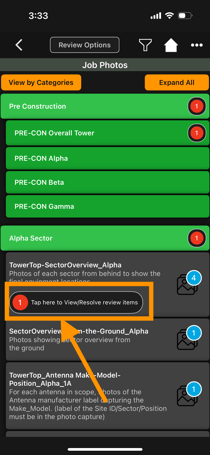
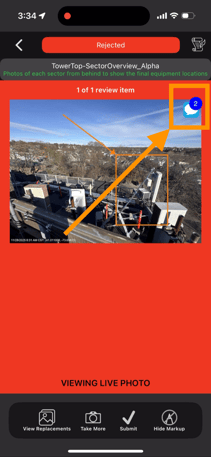
In the Pathwave mobile app, rejected photos surface as red indicators inside the job’s photo list. When a field user opens a rejected photo, they can see:
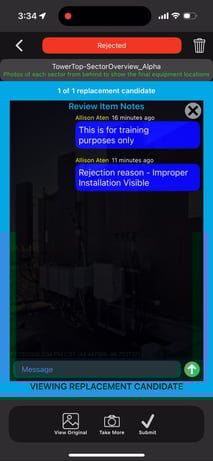
- The rejection reason
- Reviewer comments
- Attached markup
- Comparison of original and corrected photos (if applicable)
This allows field crews to quickly understand the issue and capture a replacement photo using the Re-Take action.
Best Practices for Using Rejection Reasons
For Reviewers
- Always choose the most accurate rejection reason
- Use markup to highlight the exact area of concern
- Keep written comments short and actionable
- Apply reasons consistently across all reviews
- Avoid vague or unclear language
For Administrators
- Periodically review rejection trends
- Update custom categories to match evolving scopes
- Remove unused or outdated reasons to maintain clarity
- Standardize expectations across subcontractors and regions
- Use rejection reports for training and vendor performance reviews
Impact on Quality
Effective use of rejection reasons leads to:
- Faster corrective cycles
- Higher quality documentation
- Reduced rework
- Fewer escalations
- Clearer expectations for subcontractors
- Stronger compliance for carrier and customer deliverables
- More predictable outcomes in PQAs and time-sensitive workflows