
In this release, you can now:
- AT&T DQA Punches in Pathwave
- AT&T NFSD: Launch Link to Log In/Log Out and Tracking
- Capture Safety Meeting Audio Recording and Transcription (Mobile App)
- Offsite Activity Report and Dashboard Badges
- New Digitized Form: AT&T Antenna Alignment Tool Exception Form
AT&T DQA Punches in Pathwave
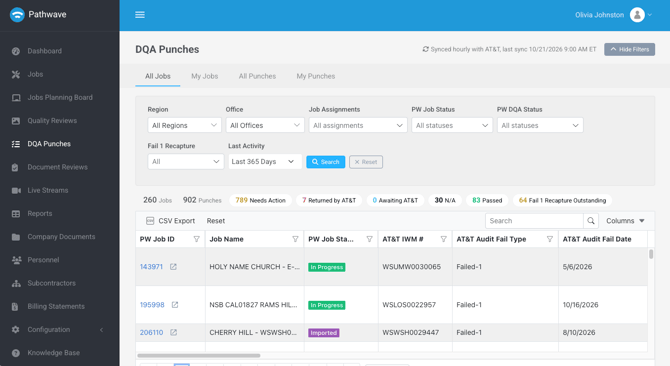
AT&T DQA Punches now flow directly into Pathwave and appear in the field, quality, and deliverable workflows your teams already use. New punches are pulled into your portal every hour, so recapture work reaches your field teams quickly.
Corrections go back to AT&T without extra steps. Photo corrections are sent directly to ESDT. When a BIM Rev is needed, Pathwave digitizes the document and sends it to ESDT for you.
Learn more: See a step-by-step walkthrough of the workflow for each Failure Type.
Note: Access AT&T-specific Knowledge Base content by requesting access here.
AT&T NFSD: Launch Link to Log In/Log Out and Tracking
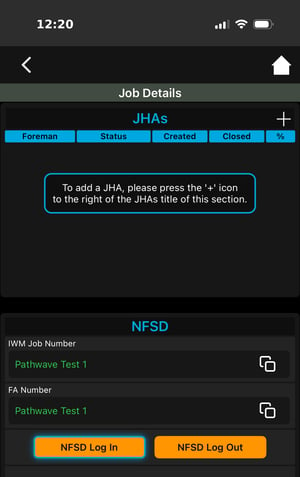
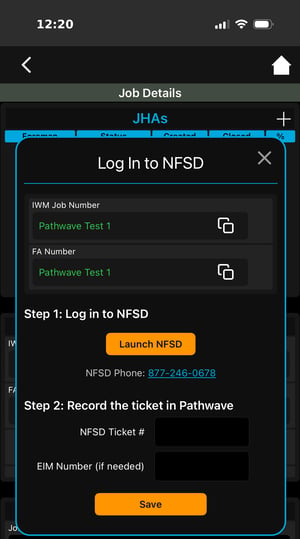
Launch NFSD from the Pathwave Mobile App and keep a geo-stamped record of every log in, log out, EIM extension, and ticket closure. Field teams are guided through each step for AT&T work. They copy the IWM Job Number and FA Location Code, complete the action in NFSD, then record the NFSD Ticket Number back in Pathwave.
Learn more: See the full NFSD workflow in Pathwave.
Note: Access AT&T-specific Knowledge Base content by requesting access here.
Capture Safety Meeting Audio Recording and Transcription
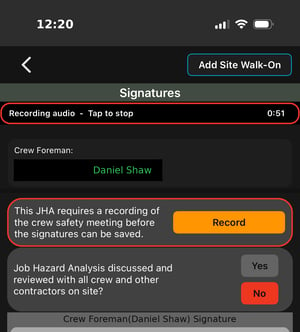
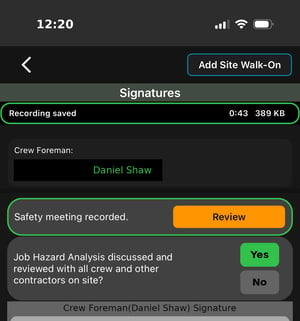
Crews can capture a Safety Meeting recording directly from the JHA Signatures screen before signatures are saved. The recording is also transcribed. Together, they provide a verifiable record that the meeting took place, covered the required topics, and included a review of the Job Hazard Analysis with the crew. While recording, users can still open the JHA form, Safety Documents, and other job references.
Learn more: How to Capture Safety Meeting Audio Recording
 |
 |
Reach out to the Pathwave Support team to enable Safety Meeting Recordings for specific JHA Types and field personnel.
Offsite Activity Report and Dashboard Badges
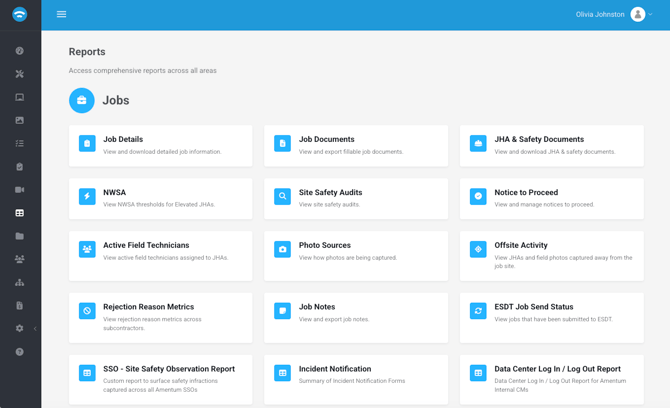
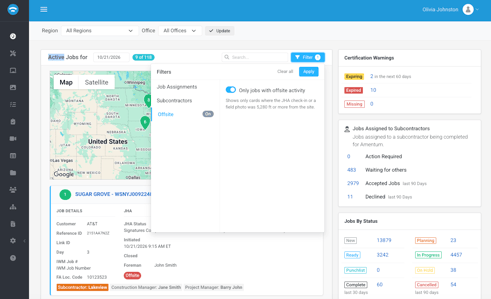
See when JHAs and field photos are captured away from the job site. The new Offsite Activity report in the Portal lists activity captured at or beyond your offsite distance. Results roll up by day, job, and partner, and you can expand any row to see who captured it. Note: Only photos captured in the field are included. Photos uploaded from the Portal or Mobile App are not counted.
- Offsite distance setting: The default is 1 mile. The Offsite distance can be adjusted for your organization.
- Dashboard badges: Hover over the JHA Offsite badge or click the Offsite Photos badge to see details. You can also filter the Dashboard to show only jobs with offsite activity.
- Distance from site: Now included in the JHA and NTP reports. This applies to JHAs only, not Safety Documents.
|
|
New Digitized Form: AT&T Antenna Alignment Tool Exception Form
The AT&T Antenna Alignment Tool Exception Form is now available as a Fillable Form in Pathwave. Completed forms are submitted directly to AT&T from Pathwave.