
In this release, you can now:
- AT&T NFSD: Launch Link to Log In/Log Out and Tracking
- Capture Safety Meeting Audio Recording and Transcription
AT&T NFSD: Launch Link to Log In/Log Out and Tracking
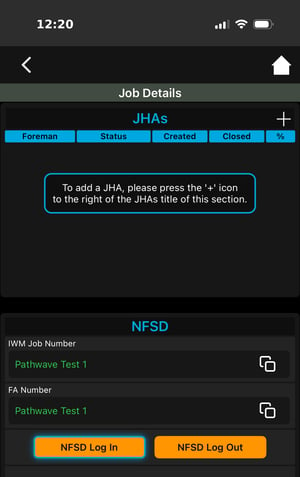
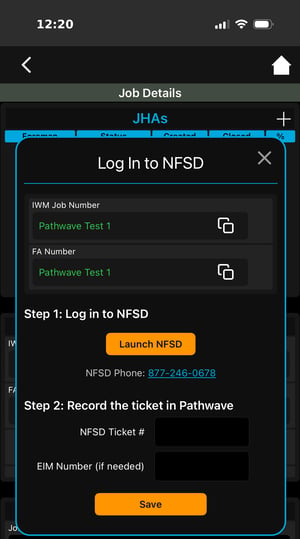
Launch link to NFSD with geo-stamped log in, log out, EIM extensions, and ticket closures.Field teams are guided through the NFSD workflows for AT&T work.
-
In Pathwave Mobile App in the Job Details > NFSD section, select Log In or Log Out.
-
Copy IWM Job Numbers and FA Location Code (and Secondary IWM Job Numbers if needed).
-
Launch NFSD in browser on mobile device. Paste the necessary project identifiers needed.
-
Log in/Log out/Close Ticket/Extend EIM through the NFSD in browser as normal.
-
Copy the NFSD Ticket Number (and EIM Number if needed).
-
In Pathwave Mobile App, record the action taken in NFSD by pasting and recording the NFSD Ticket Number into the Pathwave Mobile App.
-
Capture Safety Meeting Audio Recording and Transcription
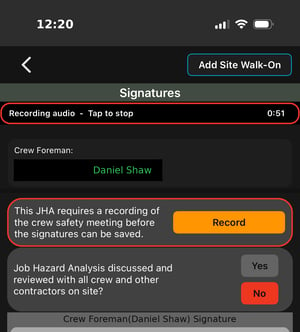
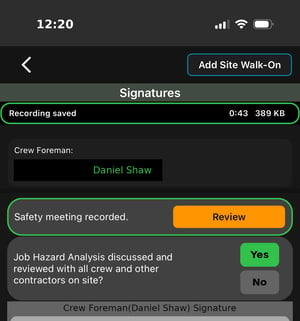
Field crews can record the crew safety meeting directly from the Signatures screen before signatures can be saved. This keeps verifiable proof safety meetings occurred, covered required topics, and that the Job Hazard Analysis was reviewed with the crew.
On the JHA Signatures page, tap to Record the Safety Meeting. Users can navigate to the JHA form, Safety Documents, and any other documentation or references while recording the Safety Meeting audio.
 |
 |
Learn more here: How to Capture Safety Meeting Audio Recording
Reach out to the Pathwave Support team to enable Safety Meeting Recordings for specific JHA Types and field personnel.